Mobile App
Currency Converter
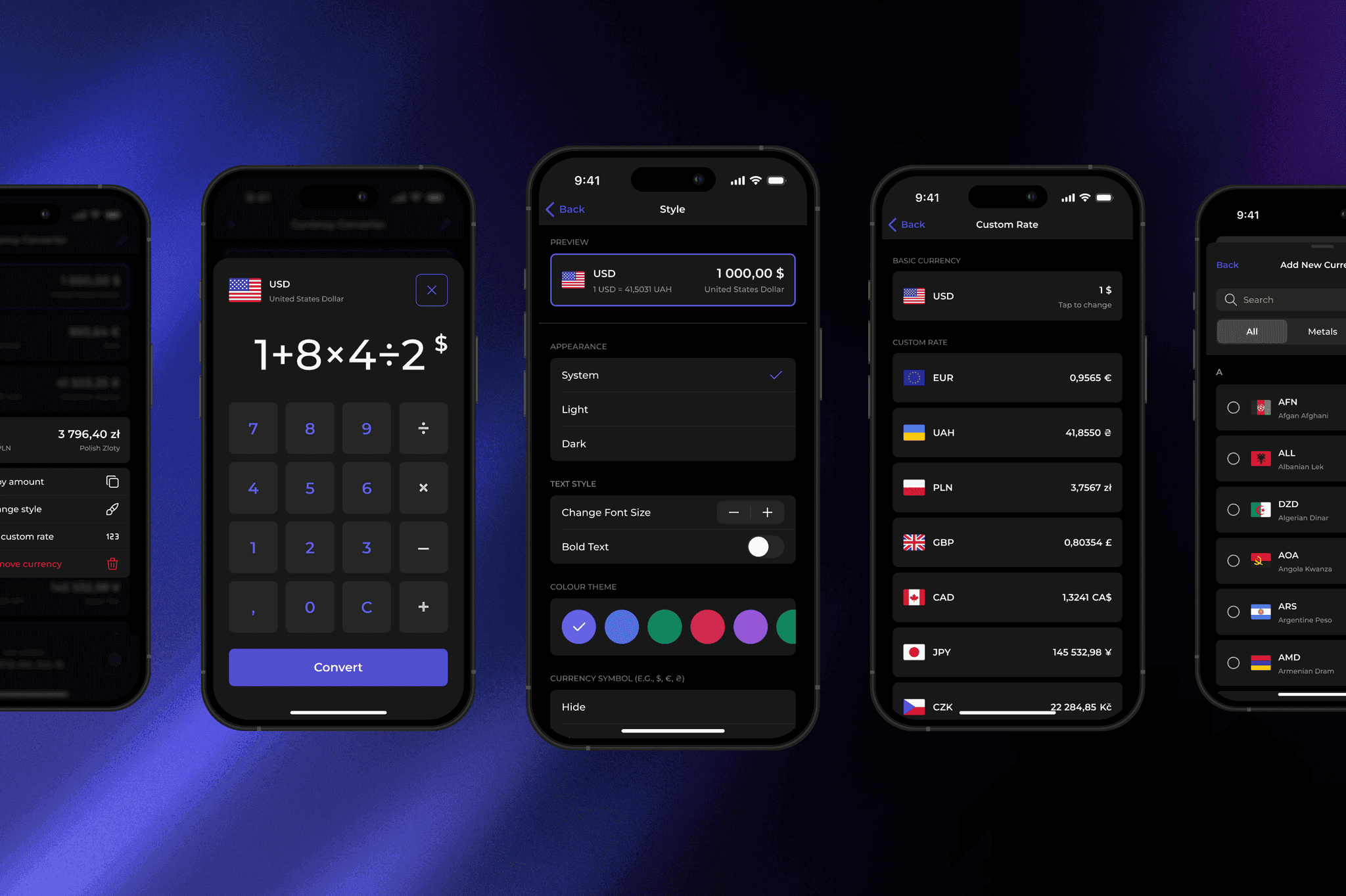
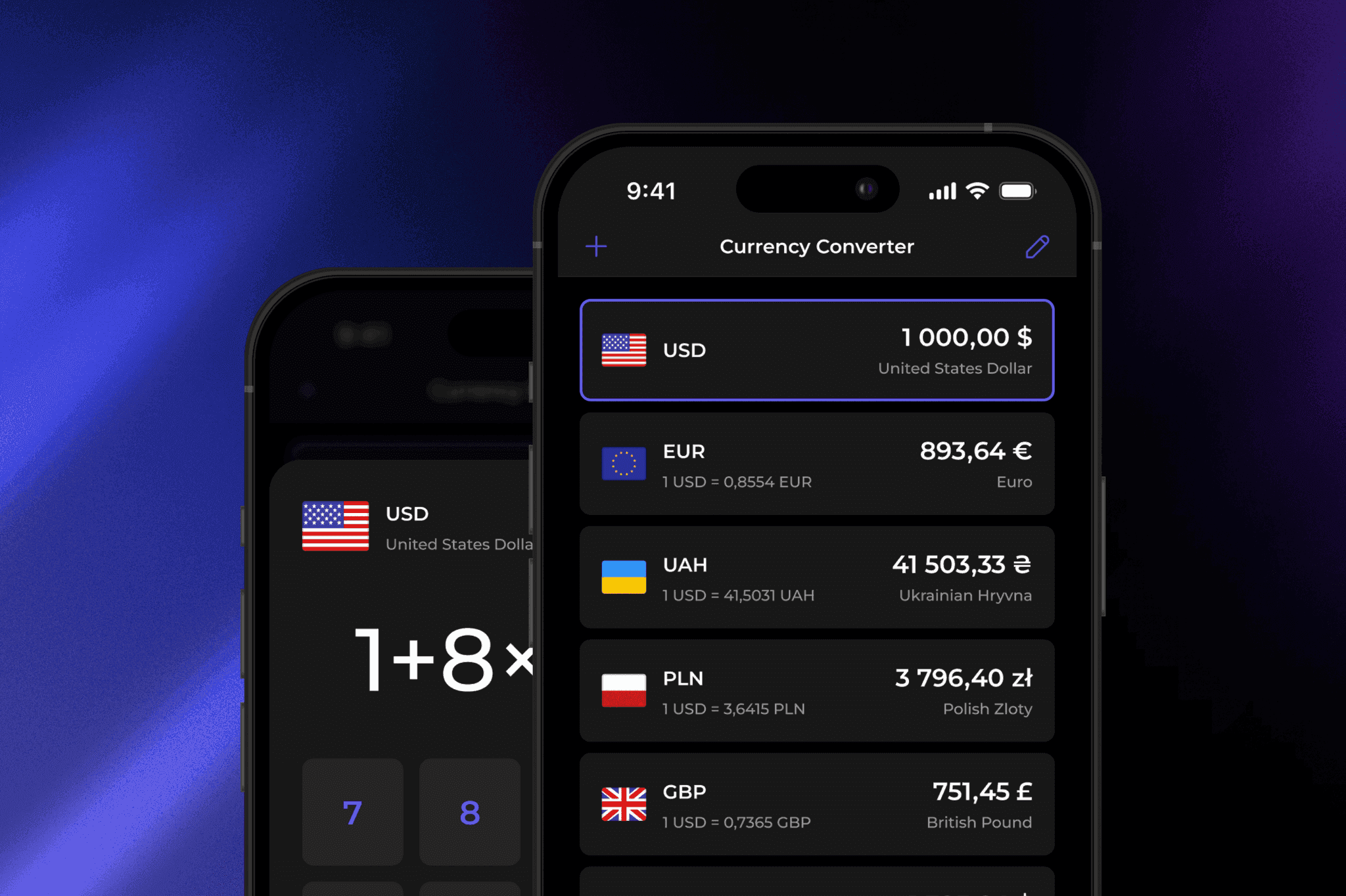
Currency Converter is a modern iOS app that helps users convert currencies quickly, intuitively, and with confidence.
Role: UX/UI Designer
Scope: UX Research, User Personas, Competitor Analysis, Information Architecture, Wireframes, UI Design, Design System, Usability Testing, Developer Handoff
Platform: iOS
01
Project Overview
The goal was to design a product that feels effortless and trustworthy, supporting users in contexts like travel, freelance work, and budgeting.
I led the full UX/UI process from research and ideation to prototyping, testing, and building a complete design system.
Interactive prototypes were created for both wireframes and final UI, using Figma’s local variables and component properties to simulate real interactions and dynamic themes.
02
Problem & Goals
Most existing currency converter apps are overloaded, inconsistent, and unintuitive.
My goal was to design a clear, structured, and fast experience focused on real user tasks and personalization.
01
Project Overview
The goal was to design a product that feels effortless and trustworthy, supporting users in contexts like travel, freelance work, and budgeting.
I led the full UX/UI process from research and ideation to prototyping, testing, and building a complete design system.
Interactive prototypes were created for both wireframes and final UI, using Figma’s local variables and component properties to simulate real interactions and dynamic themes.
02
Problem & Goals
Most existing currency converter apps are overloaded, inconsistent, and unintuitive.
My goal was to design a clear, structured, and fast experience focused on real user tasks and personalization.
03
Competitive Analysis
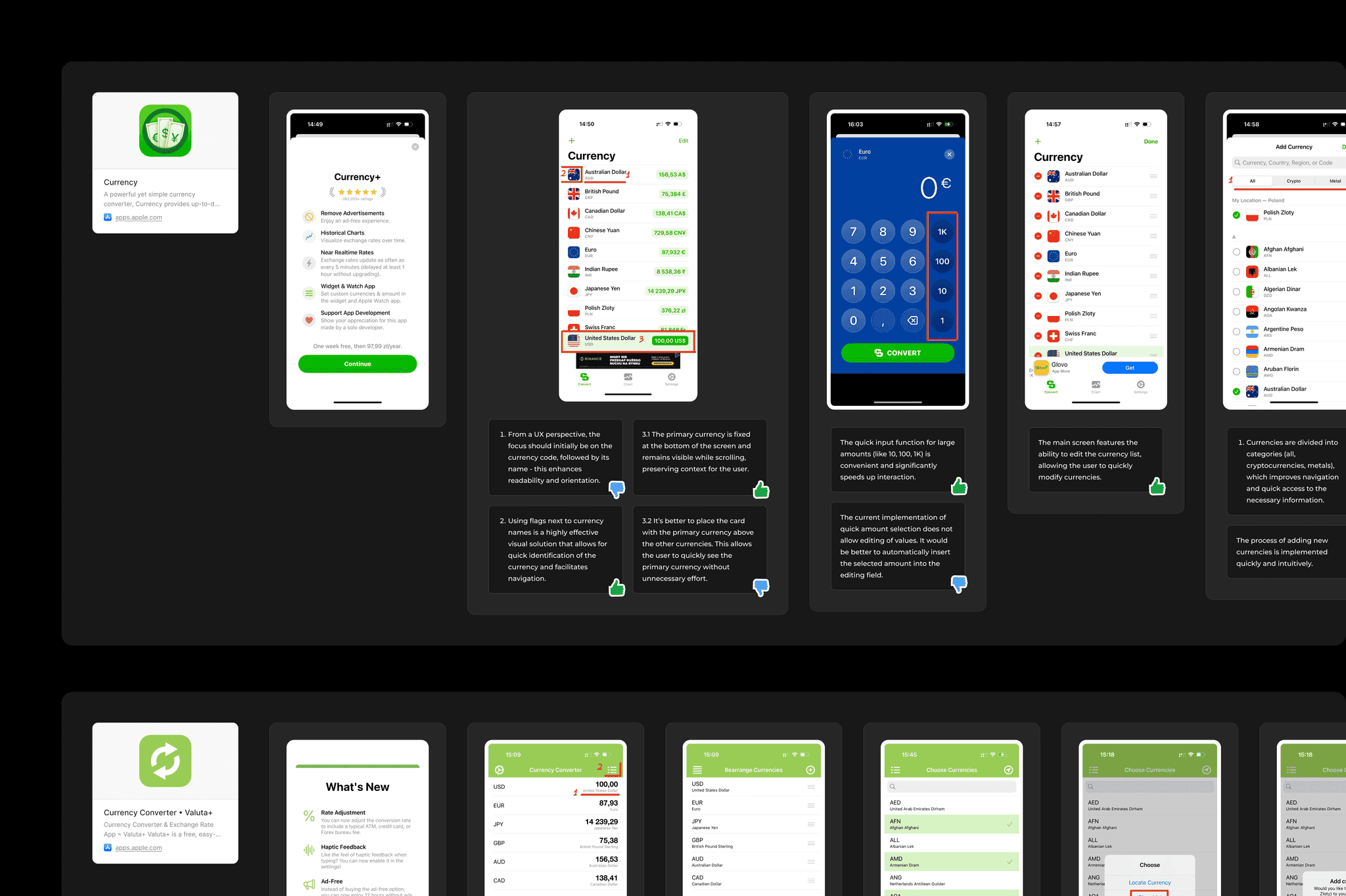
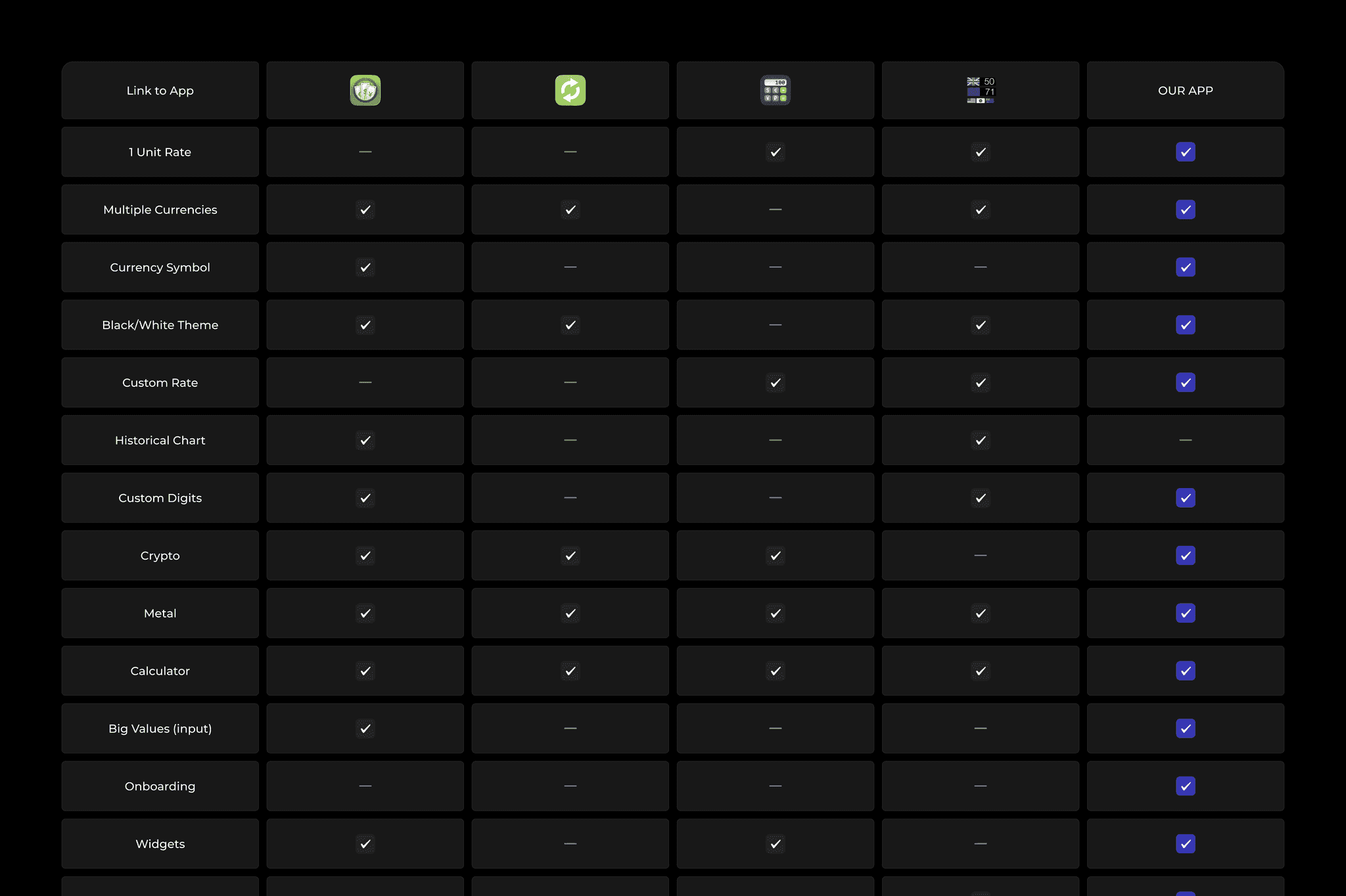
To understand the market, I analyzed four popular currency converter apps, focusing on structure, visual hierarchy, and interactions.
The research showed common issues: confusing navigation, visual overload, and poor personalization. These insights guided what to simplify and improve.
03
Competitive Analysis
To understand the market, I analyzed four popular currency converter apps, focusing on structure, visual hierarchy, and interactions.
The research showed common issues: confusing navigation, visual overload, and poor personalization. These insights guided what to simplify and improve.
04
User Personas
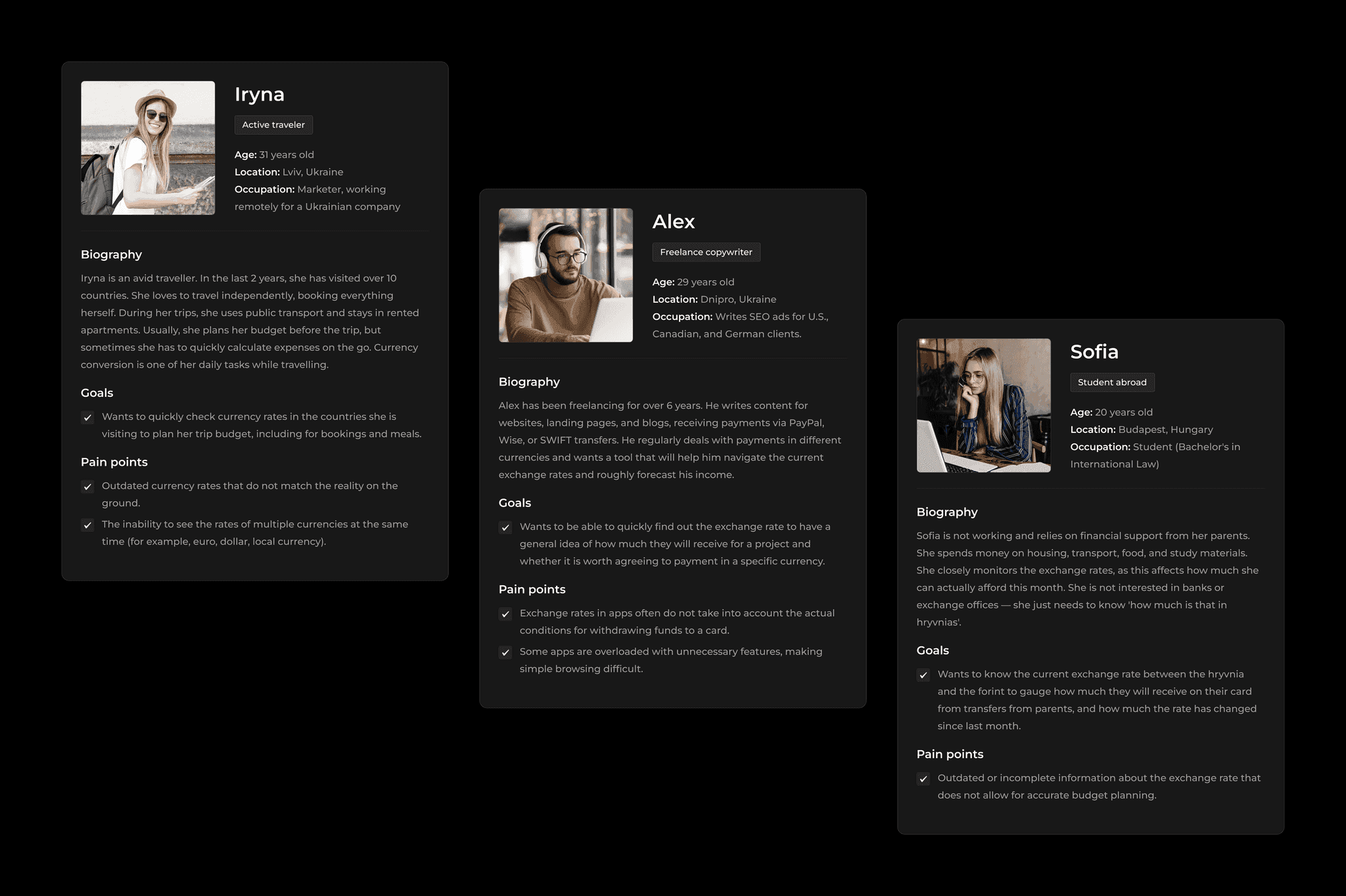
Based on the research, I created three personas that reflect real-life contexts. Each persona has unique habits and priorities, showing how different users interact with currency conversion in their routines.
These personas guided design choices and helped keep the app personal, intuitive, and efficient.
04
User Personas
Based on the research, I created three personas that reflect real-life contexts. Each persona has unique habits and priorities, showing how different users interact with currency conversion in their routines.
These personas guided design choices and helped keep the app personal, intuitive, and efficient.
05
Information Architecture
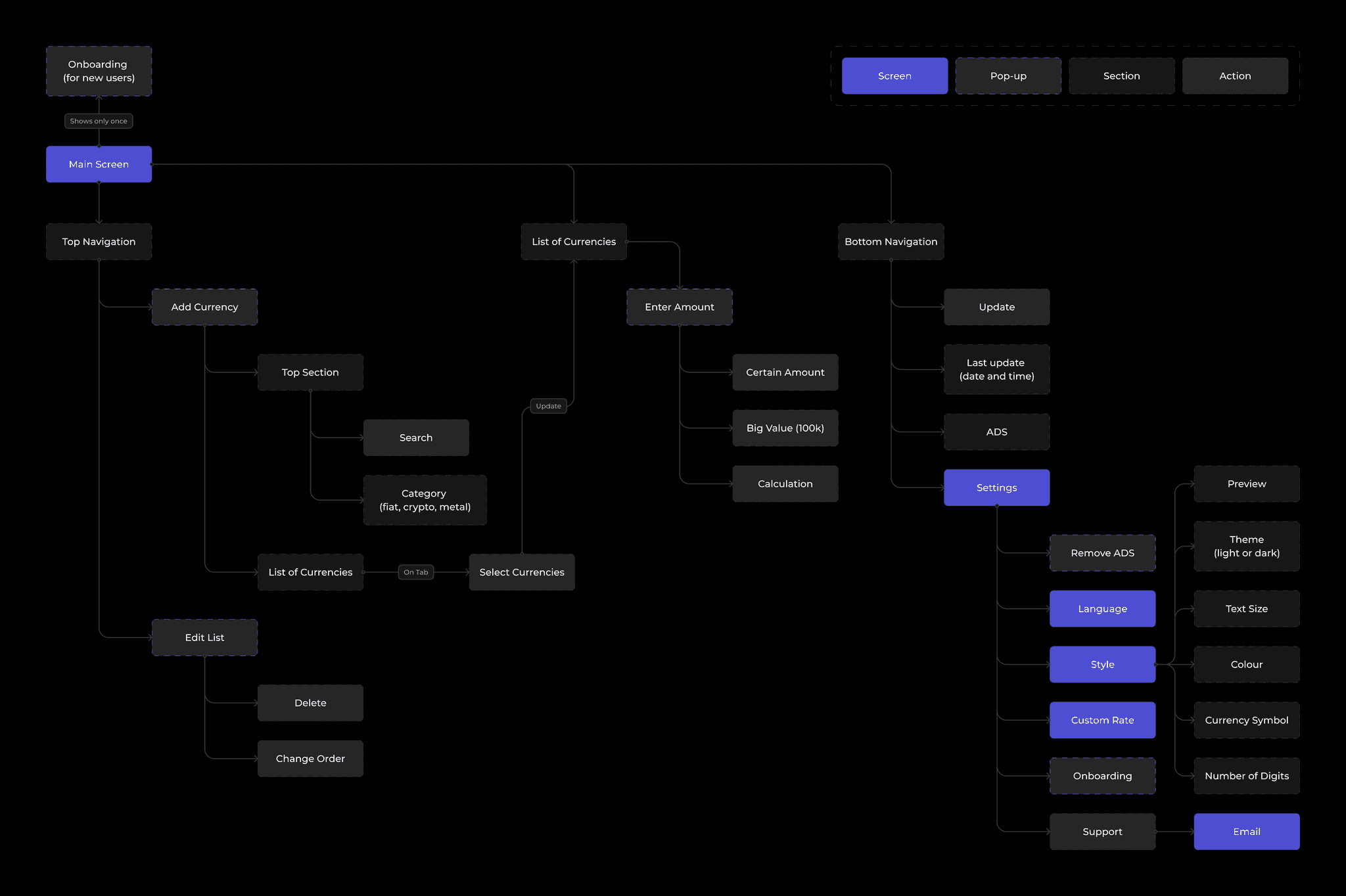
The app’s flow is designed for speed and clarity.
Each section (Conversion, Calculator, Custom Rates, Settings…) has a focused purpose, making navigation quick and natural.
05
Information Architecture
The app’s flow is designed for speed and clarity.
Each section (Conversion, Calculator, Custom Rates, Settings…) has a focused purpose, making navigation quick and natural.
06
Ideation & Wireframes
I started with quick hand sketches to test layout ideas and flow logic. Then, I moved into low-fidelity wireframes to validate navigation and hierarchy.
Each wireframe became an interactive prototype to refine logic before final UI design.
06/01
UI Design
The final interface blends clarity, hierarchy, and balance.
Every visual and motion element serves usability - clear typography, calm color palette, accessible tap areas, and consistent gestures.
Accessibility (WCAG) and iOS HIG principles guided the visual design.
Layouts adapt to one-handed use, creating a fast and natural experience.
06/02
Onboarding
Clear and minimal onboarding flow that helps users get familiar with the app instantly. Focused on quick setup and seamless first-time experience.
06/03
Custom Rate
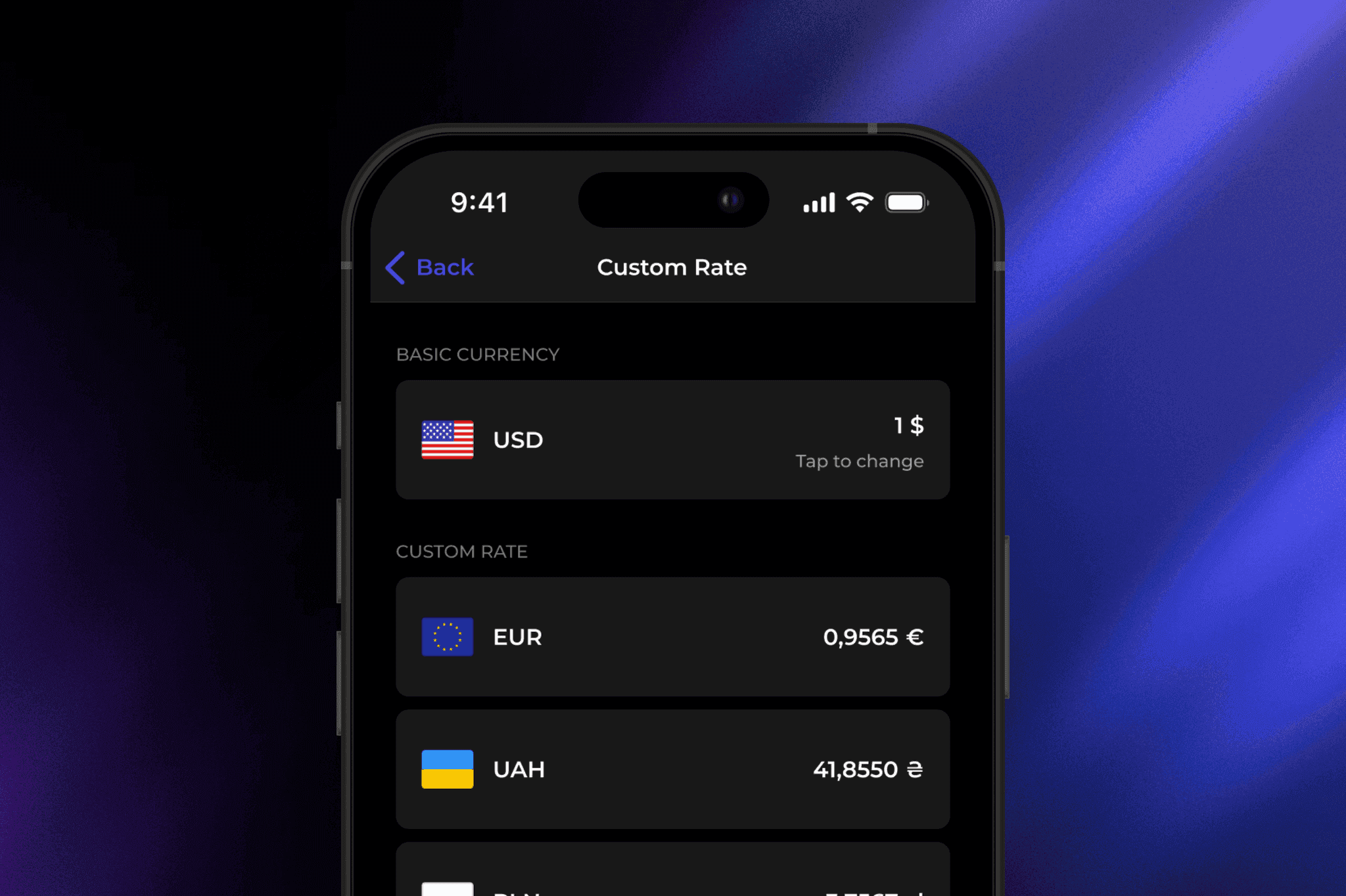
Feature that allows users to set their own exchange rate for better control and planning. Simple, precise, and intuitive interaction design.
06/04
Style Settings
Personalization made easy. Users can customize currency display styles to match their preferences and workflow.
06
Ideation & Wireframes
I started with quick hand sketches to test layout ideas and flow logic. Then, I moved into low-fidelity wireframes to validate navigation and hierarchy.
Each wireframe became an interactive prototype to refine logic before final UI design.
06/01
UI Design
The final interface blends clarity, hierarchy, and balance.
Every visual and motion element serves usability - clear typography, calm color palette, accessible tap areas, and consistent gestures.
Accessibility (WCAG) and iOS HIG principles guided the visual design.
Layouts adapt to one-handed use, creating a fast and natural experience.
06/02
Onboarding
Clear and minimal onboarding flow that helps users get familiar with the app instantly. Focused on quick setup and seamless first-time experience.
06/03
Custom Rate
Feature that allows users to set their own exchange rate for better control and planning. Simple, precise, and intuitive interaction design.
06/04
Style Settings
Personalization made easy. Users can customize currency display styles to match their preferences and workflow.
07
Design System
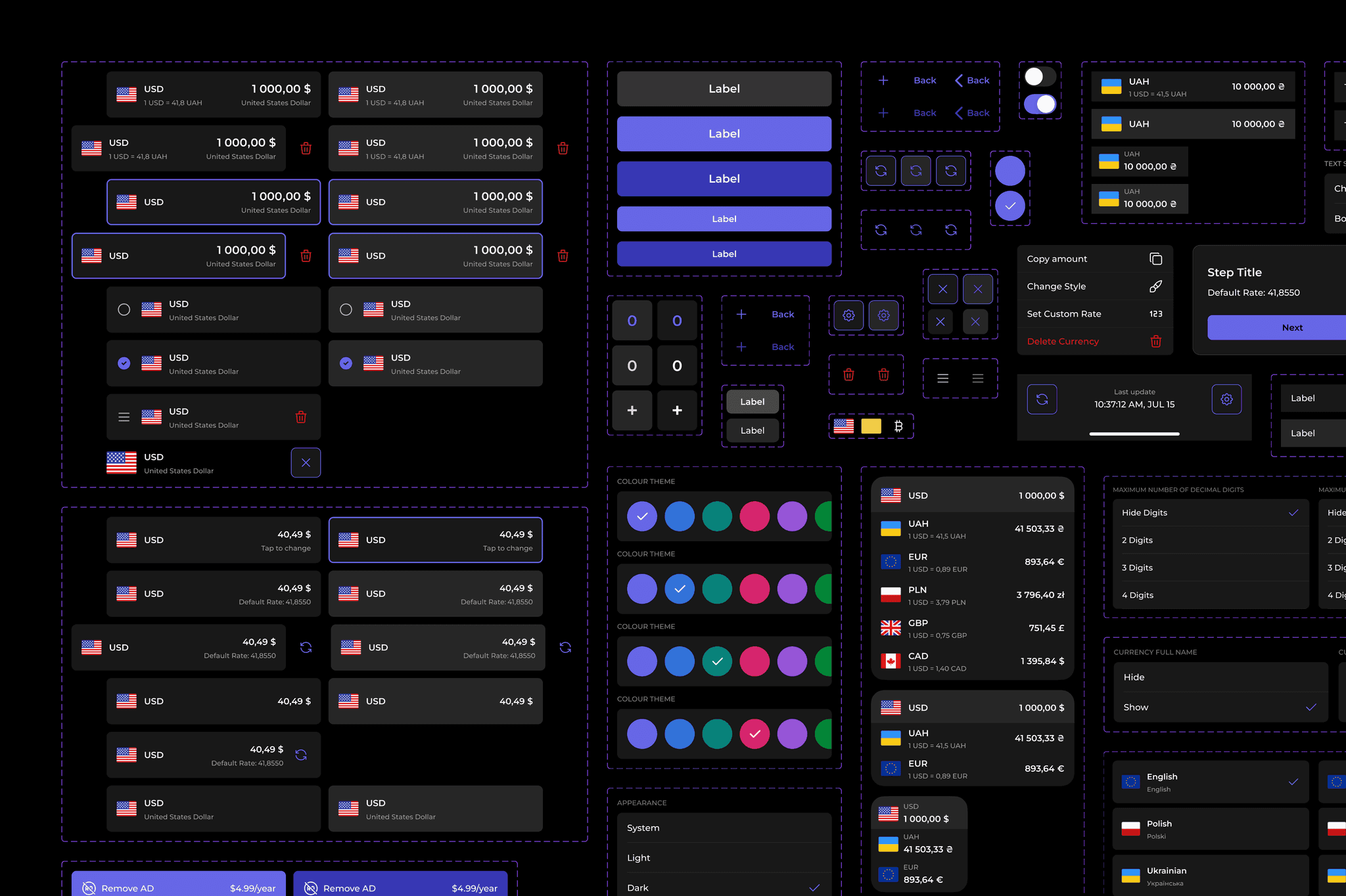
Built on an atomic design structure using Figma local variables, variants, and component properties. Includes a detailed style guide, documentation, and component hierarchy.
The system supports dynamic themes, localization, and scalable updates. Every element was designed for developer handoff with clear logic and naming.
07
Design System
Built on an atomic design structure using Figma local variables, variants, and component properties. Includes a detailed style guide, documentation, and component hierarchy.
The system supports dynamic themes, localization, and scalable updates. Every element was designed for developer handoff with clear logic and naming.
08
Interactive Prototype
To validate interactions and personalization scenarios, I built a high-fidelity interactive prototype in Figma using Local Variables, Variants, and Component Properties.
The prototype reproduced real app behavior such as dynamic theme switching, multi-language support, custom rate calculations, and gesture-based currency management.
08
Interactive Prototype
To validate interactions and personalization scenarios, I built a high-fidelity interactive prototype in Figma using Local Variables, Variants, and Component Properties.
The prototype reproduced real app behavior such as dynamic theme switching, multi-language support, custom rate calculations, and gesture-based currency management.
09
Summary
The final design delivers a smooth, reliable, and highly usable experience. Users can quickly convert currencies, personalize their workspace, and manage custom rates without friction. Interactive prototypes streamlined testing and developer handoff, while the design system ensures scalability.
This project reinforced the importance of early testing, system thinking, and iteration. Even small refinements in gesture logic, iconography, and spacing greatly enhance trust and performance.
Deliverables: clickable wireframe & UI prototypes, full design system (Figma), usability testing report, and developer handoff documentation.
09
Summary
The final design delivers a smooth, reliable, and highly usable experience. Users can quickly convert currencies, personalize their workspace, and manage custom rates without friction. Interactive prototypes streamlined testing and developer handoff, while the design system ensures scalability.
This project reinforced the importance of early testing, system thinking, and iteration. Even small refinements in gesture logic, iconography, and spacing greatly enhance trust and performance.
Deliverables: clickable wireframe & UI prototypes, full design system (Figma), usability testing report, and developer handoff documentation.